 Anyone publishing regularly runs into the same arithmetic. One idea needs a hero image, two supporting graphics, a vertical crop, a thumbnail and a version sized for whichever platform changed its specifications this quarter. That's six assets for a concept that took twenty minutes to think of. The production tail, not creativity or strategy, is what quietly determines publishing frequency for most solo creators and small teams. Fixing it means treating images as a pipeline rather than a series of individual jobs — a change in method more than a change in software.
For a long time the barrier to good visuals was skill. You either knew a professional editing suite or you didn't, and that single fact set the ceiling on what you could publish.
That barrier has largely dissolved, and something less visible replaced it: coherence. Producing one attractive image is now easy. Producing sixty images over three months that visibly belong to the same body of work is still genuinely hard, and it's precisely what audiences notice unconsciously when deciding whether a channel looks credible.
This reframes what a useful editing workflow needs to deliver. Speed is assumed. Consistency is the differentiator, and consistency is a systems problem rather than a talent problem.
The most productive habit change available to most creators is to stop editing per post and start editing per batch.
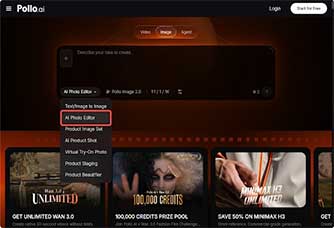
Pollo AI's AI Photo Editor supports that pattern because adjustments are described in words rather than performed manually, which means the same treatment can be pushed across a group of images simultaneously. Cutting subjects out of their backgrounds, matching colour across shots taken in different light, and lifting the sharpness of anything captured hastily all happen at the instruction level rather than the pixel level.
The practical effect is subtle but significant. When twelve images from three separate shoots receive an identical written treatment, they stop looking like twelve unrelated photos and start looking like a series. That perception of authorship is worth more to a growing account than any individual image ever is.
Plan Visual Themes, Not Individual Posts
Once a month, define three or four visual directions tied to your content pillars — not topics, but looks. This is planning at the aesthetic level, and it's what makes batching possible later. Creators who plan only subject matter end up editing reactively, which is exactly where visual drift begins.
Establish One Reference Edit
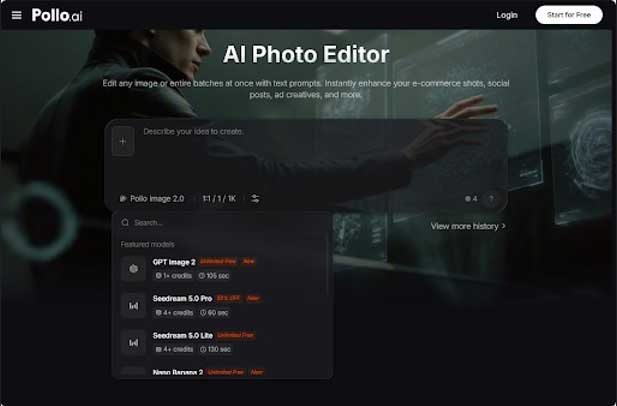
Take a single image, get it exactly right, and treat it as the specification for everything that follows. Note the wording you used. Locking that reference inside Pollo AI's AI Photo Editor before processing volume means subsequent images need only subject-level attention rather than fresh aesthetic decisions, which realistically halves the working time.
Process the Set, Then Cull Honestly
Push the whole batch through in one session, then delete without sentiment. A ratio of roughly three processed to one published is realistic. Using everything produced is the fastest route to an inconsistent feed, and culling against a reference in a single sitting is far easier than judging images piecemeal across a fortnight.
File Immediately With Descriptive Names
Spend ten minutes naming and sorting outputs by theme. It feels like admin and pays for itself within two weeks, because the alternative — re-editing something you already made and can't find — is the largest hidden time cost in any batch image editing routine.
An image library covers most of a content calendar, but not all of it. Some material genuinely needs explanation rather than illustration, and static frames handle that badly.
This is where a different class of tool applies. Vyond AI Video Generator is built for structured explanation rather than aesthetic content, with a character animation library and industry-oriented templates aimed at turning complicated information into something watchable.
The distinction is worth holding onto. Editing tools govern how your material looks; something like Vyond AI Video Generator governs how a sequence of ideas is narrated. Creators producing course material, client onboarding or process explanations often need both, while those producing purely visual content rarely need the second at all.
Once a processed library exists, the economics of publishing change, and this is where a proper AI content creation workflow stops being a phrase and starts being a schedule.
A single themed batch typically supplies a carousel, three or four standalone posts, a set of thumbnails and the raw material for a newsletter. That's around a fortnight of output from one editing session — the only realistic way one person sustains a genuine cadence alongside other work.
There's an analytical benefit too. When visuals across two weeks share a consistent treatment, performance differences between posts can reasonably be attributed to the message rather than to whether one photo happened to be better lit. Consistent visual branding isn't only an aesthetic virtue; it's what makes your own performance data interpretable.
None of this makes anyone a better creator. It removes the reason for not publishing.
Most content that never appears isn't blocked by a shortage of ideas. It stalls at the point where a decent concept meets five hours of asset preparation on a Sunday evening. Compressing that stage into a scheduled batch session doesn't improve taste, judgement or strategy — those still have to be earned slowly.
What it does is make consistency achievable for people working alone. And consistency, unglamorously, is the one thing nearly every account that grows has in common.






We use cookies to ensure you get the best experience on our website. Read more...